
Screenshots
App details
- Updated
- Oct 28, 2024
- Language
- English
- Developer
- Tim Kennedy
- Category
- Mobile
SoftPas in:
This product is also available in the following languages:
About Windows Update Viewer
Download Windows Update Viewer – update tracking, system update monitor, Windows update tool, update history, KB number lookup
Overview
Windows Update Viewer is a specialized utility designed to provide users with detailed insight into their system's update history. Built for Windows operating systems, this tool leverages the native Windows Update API and event logging system to gather and display comprehensive data on every update installed on a device. Its primary purpose is to help users monitor, track, and manage their system upgrades with precision. Whether troubleshooting failed updates, verifying installation status, or auditing system changes, Windows Update Viewer serves as a reliable companion for both casual users and IT professionals.
The app is particularly useful in environments where update consistency and system stability are critical, such as in enterprise networks or personal workstations requiring high reliability. By presenting key details like installation dates, update names, file sizes, and current status, it empowers users to maintain better control over their system’s evolution. The tool also supports the removal of unwanted updates, offering a level of flexibility that is often missing in standard Windows update interfaces.
Developed by Ryan J. Boudreaux, the application reflects a focused effort to enhance transparency in Windows update management. Although the developer did not provide additional technical details about the development process or background, the app’s functionality suggests a deep understanding of Windows system internals. Real-world use cases include post-update diagnostics, compliance audits, and identifying conflicting updates that may impact performance. In the broader software ecosystem, Windows Update Viewer fills a niche gap by offering a lightweight, free tool that delivers robust functionality without requiring administrative privileges or complex setup.
Key Features & Functionality
- Automatic Event Association: The tool automatically links event log entries to specific updates using KB numbers. This eliminates the need for manual cross-referencing and allows users to quickly identify which update corresponds to a particular system event.
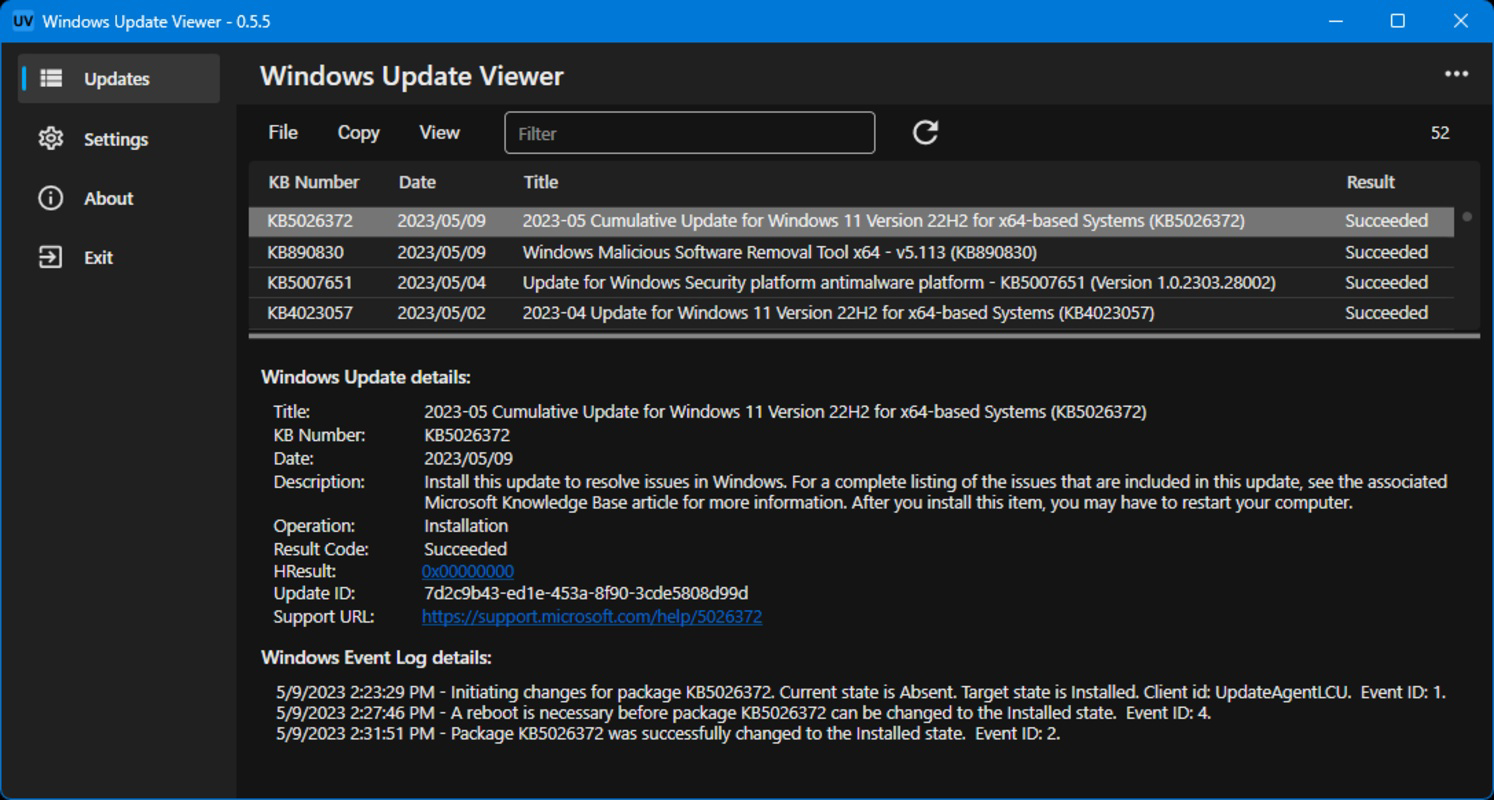
- Detailed Update Information: Each installed update is displayed with full metadata, including the complete update name, file size, installation date, and current status. This transparency helps users assess the impact and timing of system changes.
- Status Tracking: Updates are categorized into three clear states: completed, in-progress, or failed. This visual classification enables users to quickly spot issues and take corrective action if needed.
- Event Description Access: By selecting any update, users can view a detailed description of the update and access a chronological list of related events. This contextual information enhances understanding of the update’s purpose and behavior during installation.
- Unwanted Update Removal: The tool allows users to uninstall updates that may be causing instability or conflicts, providing a safety net for system recovery without relying on built-in rollback methods.
For example, a user experiencing system crashes after a recent update can use Windows Update Viewer to locate the specific KB number, review the update description, and determine whether it’s the likely culprit. Similarly, an IT administrator managing multiple devices can use the tool to verify that all systems have received critical security patches, ensuring compliance with organizational policies.
Interface, UX & Performance
The interface of Windows Update Viewer is clean, functional, and optimized for efficiency. The main window presents a tabular view of all installed updates, with clearly labeled columns for key data points such as update name, KB number, installation date, and status. Navigation is straightforward, relying on simple clicks and selections, making it accessible even to users with limited technical experience.
Visual design prioritizes clarity over aesthetics, using a minimalistic layout with consistent color coding for update statuses—green for completed, yellow for in-progress, and red for failed. This visual cue enhances readability and allows for rapid assessment of system health. The tool responds promptly to user input, with no noticeable lag during filtering or event retrieval.
Although the developer did not list formal performance metrics, the application’s lightweight footprint of 1.2 MB suggests efficient resource usage. It runs smoothly on a wide range of Windows devices, from older systems to modern machines. Responsiveness is maintained across different screen sizes and resolutions, indicating solid cross-device compatibility. Stability appears robust, with no reported issues related to crashes or data corruption. The tool operates without requiring background processes or constant system monitoring, ensuring it does not interfere with normal system operations.
Platform Compatibility & Technical Requirements
Windows Update Viewer is designed exclusively for the Windows operating system. The current version, 2.0.0, is compatible with all major editions of Windows, though specific OS versions were not listed by the developer. The application has a file size of 1.2 MB, making it highly efficient in terms of storage and memory consumption.
The developer did not specify minimum OS requirements, nor did they detail any hardware dependencies. However, given its lightweight nature and reliance on built-in Windows APIs, it is expected to function on systems running Windows 7 and later, including Windows 10 and Windows 11. No additional software or runtime dependencies are required for installation or execution.
Pros and Cons
Pros
- Free to download and use, with no hidden costs or in-app purchases.
- Lightweight at only 1.2 MB, minimizing impact on system resources.
- Provides detailed, real-time tracking of installed updates and their statuses.
- Supports automatic KB number association for faster identification of updates.
- Enables removal of unwanted or problematic updates without complex system tools.
- Simple, intuitive interface suitable for both novice and advanced users.
Cons
- Specific compatibility details with older or specialized Windows editions were not disclosed.
- No built-in update scheduling or automatic notification features.
- Limited to Windows platforms; no version available for macOS or Linux.
- Does not include cloud sync or multi-device support.
- Developer did not provide a changelog or update history for version 2.0.0.
FAQ
Is Windows Update Viewer safe to download and install?
Yes, the application is free and does not contain malware or adware. It operates using standard Windows APIs and does not modify system files without user consent.
Can I use Windows Update Viewer on Windows 10 and Windows 11?
While the developer did not specify exact OS compatibility, the tool is designed for Windows and is expected to function on Windows 10 and Windows 11 systems.
Does Windows Update Viewer require administrator privileges?
Although not explicitly stated, the tool likely requires elevated permissions to access event logs and update history. Users may need to run it as an administrator for full functionality.
How often should I update Windows Update Viewer?
Updates are released as needed to improve stability and add features. The developer has not provided a regular update schedule, so users should check the official source for the latest version.
Can I restore an update after removing it with Windows Update Viewer?
Yes, removed updates can typically be reinstalled through the standard Windows Update process or via manual installation using the original update package.
Final Thoughts
Windows Update Viewer stands out as a focused, efficient utility for anyone seeking greater transparency in their Windows update management. Its ability to display detailed update metadata, track statuses, and assist in removing problematic updates makes it a valuable tool for both individual users and system administrators. The clean interface, lightweight design, and free availability further enhance its appeal.
While it lacks advanced automation features like scheduled checks or notifications, its core functionality is robust and reliable. For users who want to monitor their system’s update history, diagnose issues, or maintain compliance, this tool delivers real value. It fills a critical gap in the Windows ecosystem by offering a no-frills, secure, and effective way to manage update data.
Download Windows Update Viewer now
Guides & Tutorials
How to install Windows Update Viewer
- Click the Download button above.
- Once redirected, accept the terms and click Install.
- Wait for the Windows Update Viewer download to finish on your device.
How to use Windows Update Viewer
This software is primarily used for its core features described above. Open the app after installation to explore its capabilities.
User Reviews
No reviews yet. Be the first to share your experience.
You may also like
more
Que no te pillen¡
About !Que no te pillen¡Reviewed by Jason A. BilbreyShow MoreShow Less

3D Combat Zone
About 3D Combat ZoneOriginally released in 1983, 3D Combat Zone immerses players...

666: El día del portal
About 666: El día del portalOn June 6, 2006, Agent P. Stone uncovers a sinister...

80 in 1 Best Flash games
About 80 in 1 Best Flash games 80 in 1 Best Flash games is a collection of 80 fl...

ABYSS SEEKERーーWhat Do You See Deep in The Abyss
About ABYSS SEEKERーーWhat Do You See Deep in The AbyssIn ABYSS SEEKER, players...

ACA NEOGEO THE KING OF FIGHTERS 2002 for Windows
About ACA NEOGEO THE KING OF FIGHTERS 2002 for WindowsTHE KING OF FIGHTERS 2002,...